
Building a 3D Warehouse Visualizer with Three.js
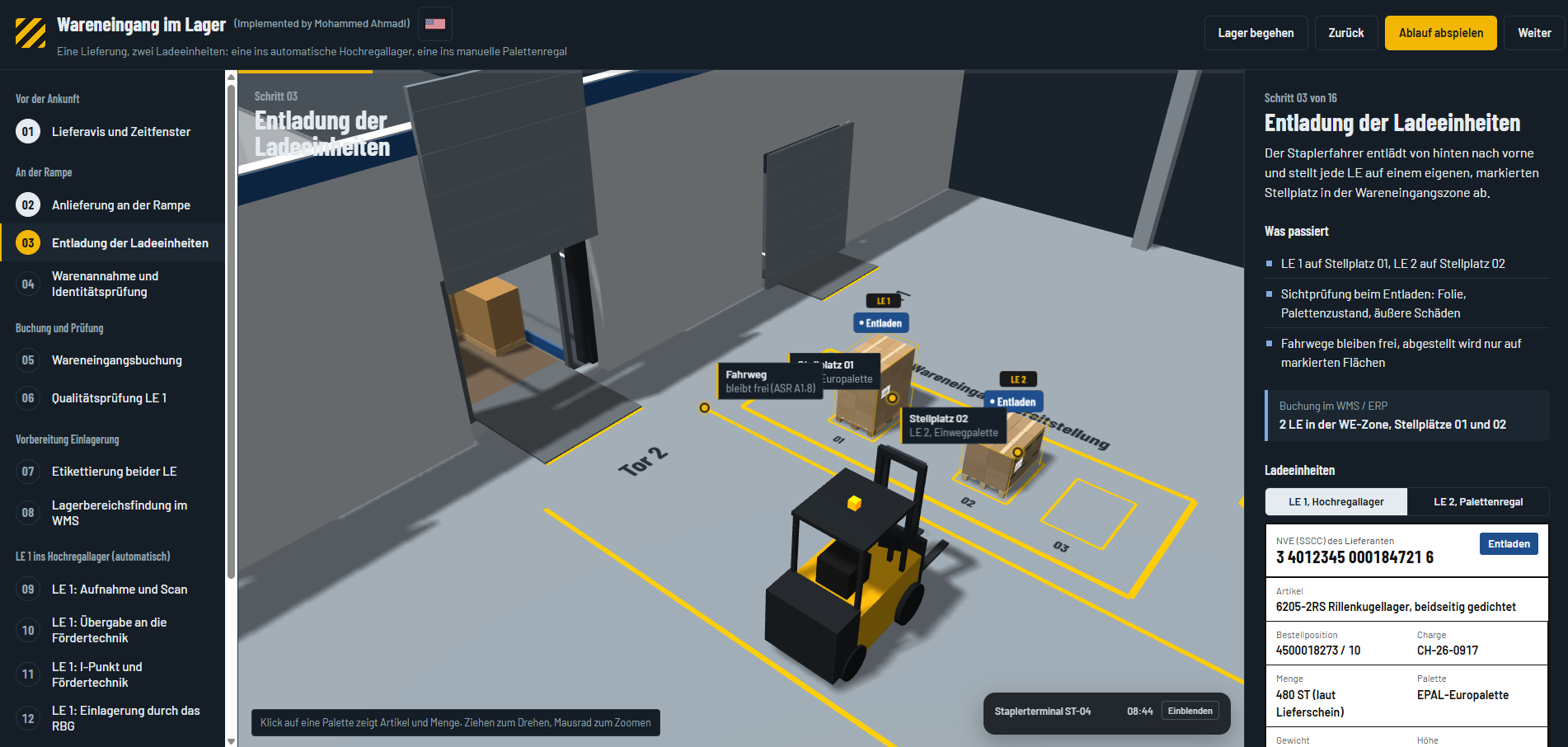
I've been building a 3D warehouse visualizer — a way to show how a warehouse actually works, right in the browser, instead of explaining it with a flow chart or a slide. Warehouses are hard to describe on paper: goods, people, vehicles, and software systems all interact in a specific order, and that order is the whole point. So I put the whole thing into 3D and made it something you can click through.
What You're Looking At
The first scenario I built is a goods receipt — the process that starts when a delivery arrives at the dock and ends when the goods are stored and booked in the system. It's a 16-step walkthrough: the delivery notice and time slot, the arrival at the ramp, unloading two load units, the identity check, the goods receipt posting, a quality inspection, labeling, and the warehouse management system (WMS) working out where each pallet belongs.
From there the two load units take different paths. The first goes into an automated high-bay warehouse — handed over to a conveyor, checked at the inspection point, and put away by a storage and retrieval machine. The second is driven by forklift to a manual pallet rack, where the storage location is verified, scanned, and confirmed.
Try It Yourself
It runs live in your browser, with nothing to install. Step through the process with Back and Next, let it play automatically, or take a walk through the warehouse yourself. Click a pallet to see its article and quantity; drag to rotate the view and scroll to zoom. The interface is available in German and English.
Try it live: lama-space.com/3D-Warehouse
A Little About Three.js
The 3D is built with Three.js, a JavaScript library that sits on top of WebGL, the browser's built-in graphics API. Without it, drawing anything in 3D means writing low-level graphics code; with it, you work with familiar concepts — a scene, a camera, lights, and objects you place and move around.
The warehouse is assembled from simple building blocks: boxes, planes, and cylinders combine into pallets, racks, dock doors, and the forklift. Repeated objects are drawn as instanced meshes, so many copies render in a single pass, text labels inside the scene are generated as textures, and orbit controls handle the drag-to-rotate and scroll-to-zoom camera. That's also why I picked it: the code stays readable, and each piece is easy to change or extend.
Where It Goes From Here
Right now this is a solid foundation, not a finished product — and honestly, there's a lot of work left to make it truly robust and plug-and-play. The direction I'm aiming for:
- Layouts and processes described as data instead of being hard-coded, so a new warehouse or workflow doesn't mean rewriting the scene
- A library of reusable building blocks — racks, docks, conveyors, vehicles — that can be combined freely
- Feeding it real data from a warehouse management system, so it can show live operations and not only a scripted walkthrough
If you work with warehouses, logistics software, or 3D on the web and have ideas or feedback, I'd love to hear them — you can reach me through the contact page.

Mohammed Ahmadi
Software Developer
Recommended
- Request-Response API Styles: REST vs gRPC vs GraphQL vs SOAP
- Visualizing SBOMs with the Dependency Radar: A Practical Approach to Dependency Management
- End-to-End Testing with Playwright — Quick Setup & Best Practices
- A Step-by-Step, Real-World Guide to Securing Company-to-Company API Communication Using OAuth 2.0
- Resilience4j in Spring Boot: From Zero to Production-Ready Fault Tolerance
- JBang: Turning Java Into a Scripting Language